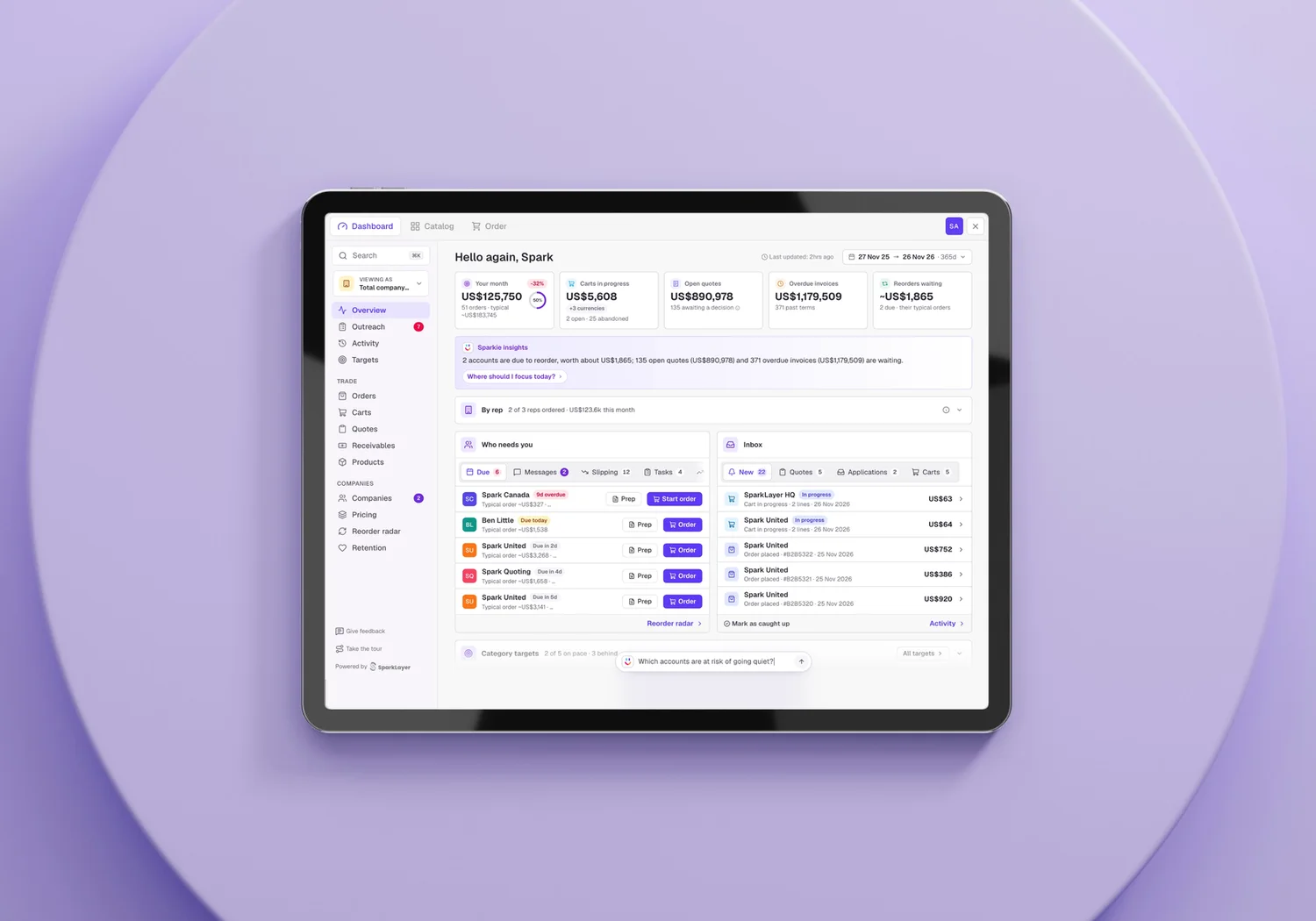
A B2B order-taking app lets your sales reps place wholesale orders for customers at each customer's own prices and terms, from the office, a trade counter or a phone. On Shopify, native B2B lets staff build draft orders in the admin. SparkLayer gives sales reps your storefront as each customer, with Quick buy, counter ordering and AI order upload, from $49 a month.
Quick summary
- Pick a tool by how your sales reps actually take orders: by phone and email, on visits, at a trade counter or a trade show.
- Shopify's native B2B has draft orders on every B2B plan. Sales staff permissions start on Grow.
- SparkLayer includes sales rep ordering from Starter, with 1 sales rep included and $39 a month for each extra one.
- Most wholesale pricing apps are built for buyers ordering on their own. Check whether sales rep ordering is included, an add-on or missing.
- Check the plan, not the feature list. The plan a feature sits on decides what you pay.
What is a B2B order-taking app?
A B2B order-taking app is software your sales team uses to place orders for wholesale customers. The sales rep picks the customer, builds the order at that customer's prices and checks out on their payment terms. The order then lands in your store like any other.
It sits next to self-serve ordering, not instead of it. Many wholesale buyers now log in to a B2B ordering portal and order on their own. But plenty still phone, email a spreadsheet or wait for a visit. Those are the orders an order-taking app is for.
Without one, a sales rep usually writes the order down and someone in the office types it in again. That is slow, and it is where wrong prices and missed lines creep in.
Where sales reps take wholesale orders
Most wholesale teams take orders in four places. Each one needs something slightly different from the tool.
| Where the order happens | What the sales rep needs | In SparkLayer |
|---|---|---|
| Phone and email | To find the customer fast and build a long order line by line | Sales rep ordering: open the customer's account and build the basket at their prices |
| Emailed POs and spreadsheets | To turn the file into a basket without retyping it | AI Intelligent Cart: upload the file or forward the email, from Starter |
| Account visits | The whole range at the customer's prices, and their order history | Quick buy and customer order history, from Starter |
| Trade counter or show floor | To scan products and complete the order while the customer is there | POS counter, from Starter |
Can Shopify's native B2B take orders for customers?
Yes, through draft orders in the Shopify admin. Shopify now offers B2B on the Basic, Grow, Advanced and Plus plans, not on Starter or Retail. Its B2B plan features page lists draft order to invoice on all four plans. Sales staff permissions are listed on Grow, Advanced and Plus, but not Basic.
So your team can build an order in the admin and send the customer an invoice. That works when orders are occasional and the person taking them already works in Shopify.
It is a different job from a sales rep ordering tool. A draft order is built in the back office. A sales rep app puts the sales rep on your storefront as the customer, with the customer's prices, quantity rules, order history and payment terms in front of them. It suits sales reps on the road, at a counter or on the phone all day.
How each option handles sales rep orders
We checked each app's own Shopify App Store listing on 26 November 2026 for how sales reps take orders and what that costs. If you want the wider view of these apps, see our best Shopify wholesale apps guide.
| Option | How sales reps take orders | Quick or bulk ordering | Where it starts |
|---|---|---|---|
| Shopify native B2B | Draft orders in the admin, sent as an invoice. Sales staff permissions from Grow | Quick order list for buyers on the storefront | Included on Basic, Grow, Advanced and Plus |
| SparkLayer | Sales reps order as the customer on your storefront, at their prices and terms | Quick buy, POS counter and the AI Intelligent Cart | Starter, $49 a month, with 1 sales rep. Extra sales reps $39 a month each |
| BSS B2B Wholesale Pricing | A sales rep add-on, $29 a month for 3 sales reps (+$9 each after that) | Quick Order add-on, $9 a month | Advanced, $49 a month, plus the sales rep add-on |
| Wholesale Pricing Discount B2B | Manual and draft orders for wholesale. No sales rep feature listed | Not listed | Professional, $44.99 a month |
| Wholesale Gorilla | Manual orders. No sales rep feature listed | Quick order form from Advanced, $69.95 a month | Lite, $34.95 a month |
| Sami B2B Wholesale Pricing | No sales rep feature listed | Quick order form for buyers from Silver, $24.90 a month | Free plan. Payment terms from Gold, $49.90 a month |
The pattern is clear. The wholesale pricing apps are built around buyers ordering for themselves. BSS sells sales rep ordering as an add-on. Wholesale Pricing Discount B2B and Wholesale Gorilla let your team create manual orders in the admin, much like Shopify's draft orders. SparkLayer builds sales rep ordering into every paid plan.
How a sales rep takes an order in SparkLayer
Sales Rep Ordering uses the same customer groups, price lists and account rules as your self-serve B2B store. Nothing is rebuilt for the sales team. A typical order runs like this.
- See who needs you. SparkLayer Pulse shows each sales rep which of their customers need attention and why: who is due to reorder, which accounts are going quiet and which quotes need chasing.
- Open the customer's account. The sales rep opens an assigned account from your storefront. You can limit each sales rep to the accounts they look after.
- Build the order. Line by line in the basket, all at once in Quick buy, or from an emailed order with the AI Intelligent Cart. Repeating a previous order works too.
- Check out on the customer's terms. Net terms or payment on account, and the customer's saved addresses, with line prices edited or discounts applied where you allow it.
- The order lands in your store. It goes through your existing checkout with the sales rep who placed it recorded on the order. There is no re-keying and no separate sales order system.
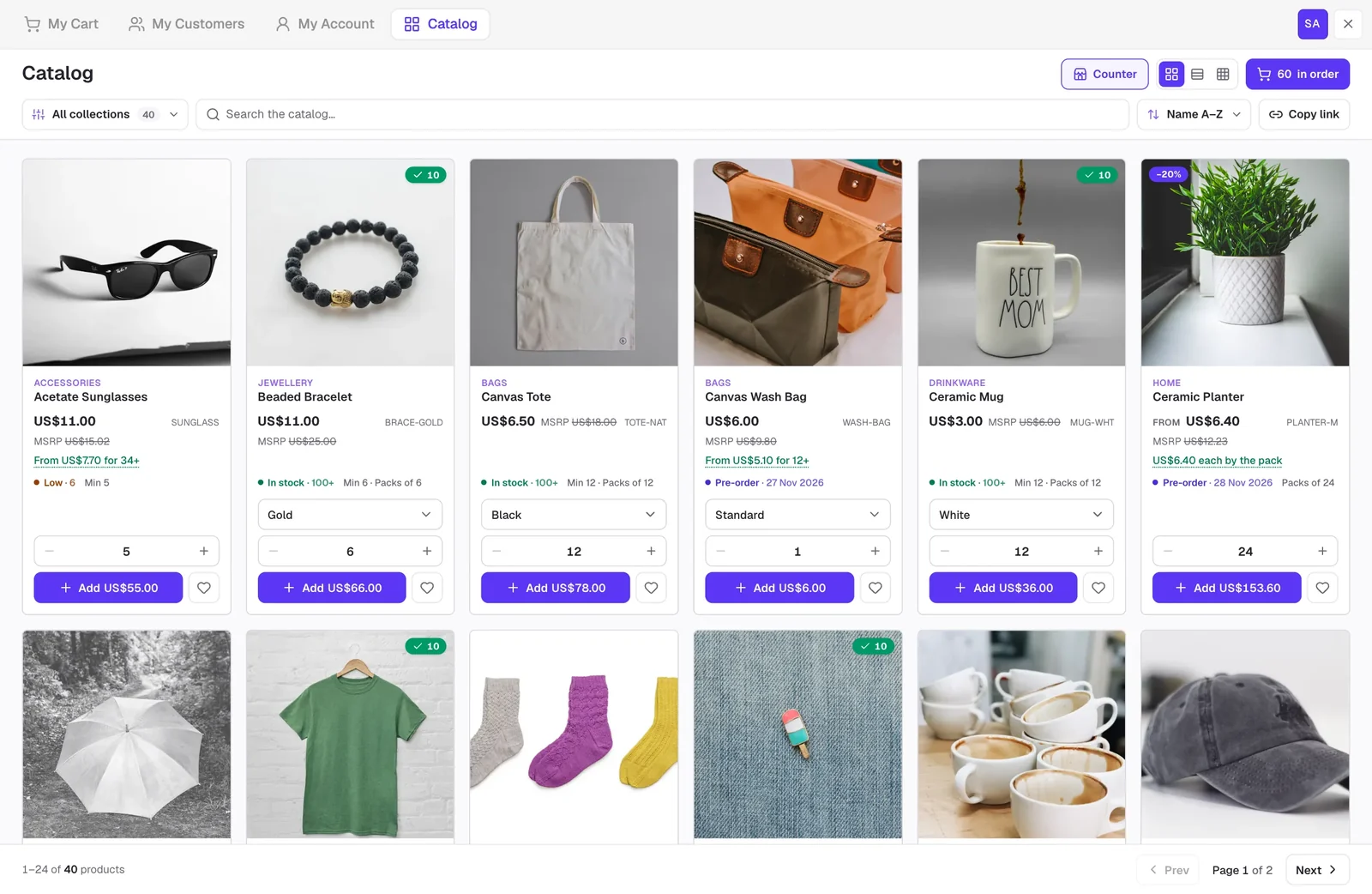
Quick buy is for the customer who knows what they want. The whole range sits on one screen at their prices, with volume breaks, pack sizes and stock, ready to add in one go.
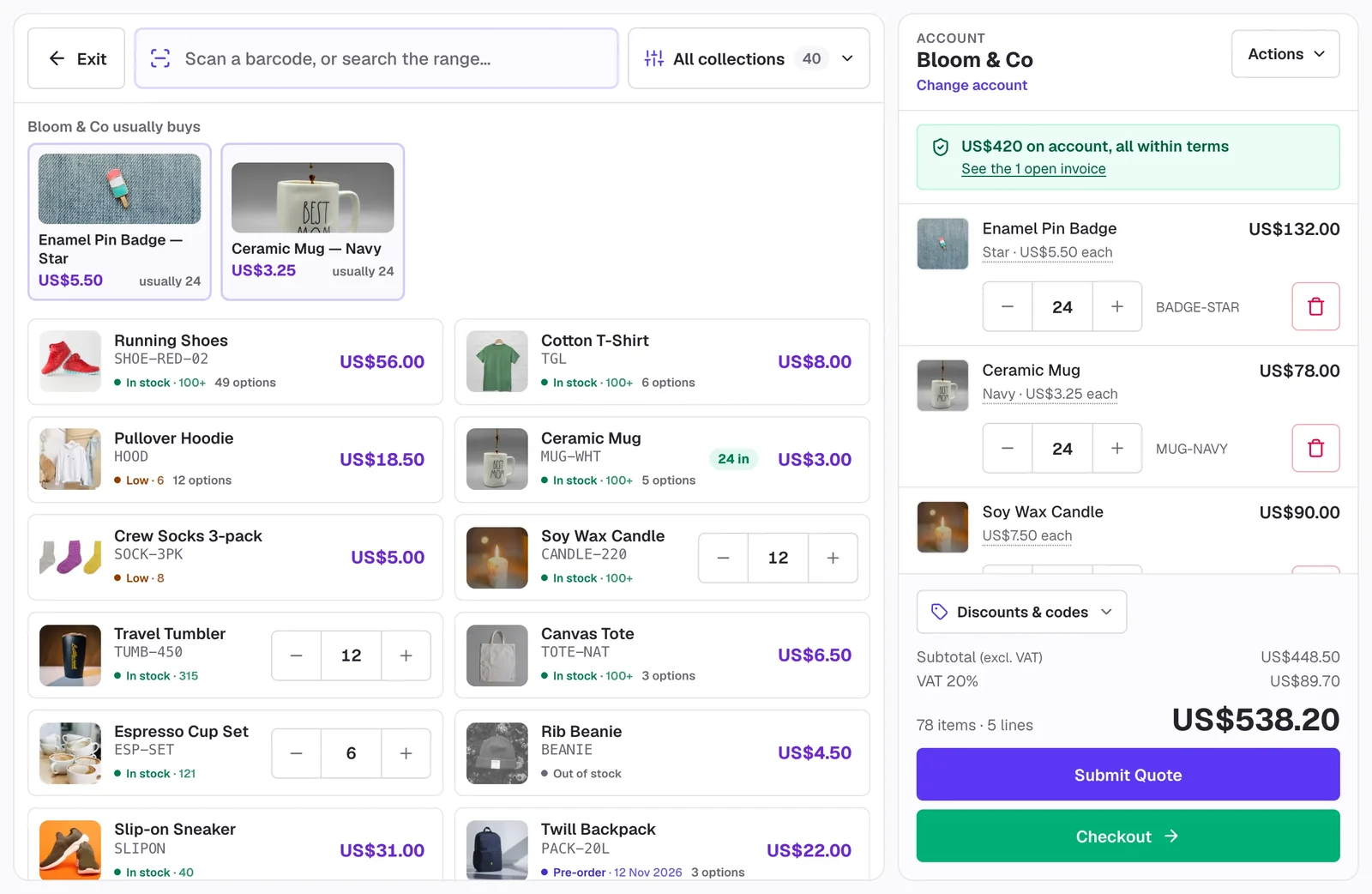
POS counter is for the customer standing in front of you. Scan a barcode, tap their usual products, check their balance and terms, and complete the order there and then.
The AI Intelligent Cart handles the orders that still arrive by email. Forward the email or drop in a spreadsheet, PDF or photo. SparkLayer matches the products and builds the basket at the customer's prices. Anything it isn't sure about is left for the sales rep to review.
Pulse and Sales Rep Ordering are included with every paid plan. Starter includes 1 sales rep, Growth 2 and Pro 5. See pricing for the full plan list.
✓Pros
- Sales reps see the same prices, quantity rules and terms as the customer, so the order is right first time.
- Quick buy, POS counter and the AI Intelligent Cart cover phone, counter and emailed orders from Starter.
- Sales reps use the storefront your buyers already use, so there is no separate order entry system to learn.
- Pulse tells each sales rep who to call before they start taking orders.
✕Cons
- Sales rep ordering isn't on the free Basic plan.
- Plans include a monthly B2B order allowance: 50 on Starter, 100 on Growth and 150 on Pro. Going over doesn't stop anything, and our team gets in touch to talk about plans.
- Recurring orders start on Growth. Xero and QuickBooks integrations start on Pro.
How Lezyne, Espresso Gear and Gentec take orders
 3xmore B2B customers ordering online within two months. Sales reps were trained and live within 6 months.Read the story
 +40%B2B revenue. The sales team builds orders for approval and uploads PDFs for customers.Read the story
 60 to 5price lists. Internal and external sales reps manage multiple customer accounts.Read the story
Lezyne, the cycling accessories brand, wanted to make it easier for its sales reps to place orders for customers and manage their order history without needing technical skills. Its sales reps now manage their customer accounts in SparkLayer, placing orders for customers and repeating past orders.
“With SparkLayer, we were able to implement and build our new B2B store, train our sales reps, and deploy our new solution within 6 months. Within just two months of deployment, we have tripled the number of B2B customers using it."
Brad Buxton, Business Development and Sales, LezyneEspresso Gear's sales team logs in for customers to build orders for approval, upload PDFs and handle more complex orders. Alongside self-serve ordering, Espresso Gear reports 40% more B2B revenue and 80% less time on manual B2B tasks each week.
Gentec has internal and external sales reps, some of them looking after several store accounts. Its previous platform made switching between accounts hard. Sales rep ordering in SparkLayer helped them manage multiple accounts efficiently, and Gentec cut its price lists from 60 to 5.
What to check before you choose
Feature lists rarely say which plan a feature is on, and the plan decides the cost. Ask these four questions of any app before you install it.
- Does it include sales rep ordering, and on which plan? Some apps sell it as an add-on. Others only offer manual or draft orders in the admin.
- How many sales reps does the price cover? SparkLayer includes 1 to 5 depending on the plan, then $39 a month each. BSS's add-on covers 3, then $9 each.
- Does the sales rep see the customer's own prices and terms? If they build orders at list price and fix them later, you are back to re-keying.
- Can it handle the orders that arrive by email? If most orders still come in as PDFs or spreadsheets, check for AI order upload or CSV import.
FAQs
What is a B2B order-taking app?
It is software your sales reps use to place wholesale orders for customers. The sales rep picks the customer, builds the order at that customer's prices and checks out on their terms. The order lands in your store like any other.
Can Shopify's native B2B take orders for customers?
Yes, with draft orders in the admin. Shopify's help page lists draft order to invoice on the Basic, Grow, Advanced and Plus plans, and sales staff permissions on Grow and up. A sales rep app goes further: it puts the sales rep on your storefront as the customer, with Quick buy, counter ordering and AI order upload.
Can my sales reps take orders at each customer's own prices?
Yes. In SparkLayer a sales rep opens the customer's account and sees the products, prices, terms and ordering rules set for that customer. Sales Rep Ordering is included from the Starter plan at $49 a month.
Can sales reps turn an emailed or PDF order into a cart?
Yes, with SparkLayer's AI Intelligent Cart, from the Starter plan. Forward the email or upload a spreadsheet, PDF or photo. It matches the products and builds the basket at the customer's prices, and leaves anything it isn't sure about for review. CSV order importing is on every plan.
Can wholesale buyers place orders without contacting a sales rep?
Yes. Buyers log in to a B2B ordering portal, see their own prices and order or reorder whenever they like. Many brands run both, so sales reps spend their time on the accounts that need them.
How much does sales rep ordering cost in SparkLayer?
It is included with every paid plan. Starter ($49 a month) includes 1 sales rep, Growth ($149) 2 and Pro ($299) 5. Extra sales reps are $39 a month each on any paid plan. Every paid plan has a 14-day free trial.
Can an order-taking app connect to my ERP or accounting software?
Check the plan. SparkLayer's Xero and QuickBooks integrations and its custom API for ERPs start on Pro, and Enterprise adds direct ERP integration. BSS lists APIs to sync pricing with your ERP on its Platinum plan at $99 a month.
Try sales rep ordering on your store
The right order-taking app depends on where your orders come from. If your sales reps take orders by phone, at a counter or from emailed POs, they need your storefront at each customer's prices, not a draft order in the back office.
SparkLayer adds that to the Shopify store you already run. Start a 14-day free trial, or see Sales Rep Ordering and book a demo with the team.